Important information was difficult to scan.
Project details, versions, documents, and activities were not easy to identify quickly. Users had to spend additional effort searching for information instead of focusing on their engineering tasks.
I redesigned a legacy version-management platform into a structured enterprise system that helps engineering teams find, manage, verify, and track software versions, documentation, approvals, and project activity with greater clarity and traceability.
Engineering teams managing enterprise software assets relied on disconnected, folder-based version tracking systems. Changes were frequently overwritten, audit trails were incomplete, and there was no structured way to manage responsibilities across different roles.
The objective was to design a unified enterprise version control platform with clear role-based workflows, complete traceability, and a modern information architecture that could scale with growing engineering teams.
The primary user manages software versions, project information, documentation, and release history. They need enough context to make confident decisions without reconstructing the story themselves.
Engineering & Version Management
“I need to quickly know which version is current, understand what changed, and verify whether the information is reliable. I shouldn't have to search across multiple places to understand a project's history.”
Find versions quickly, access documentation, track changes, understand approval status, and maintain accurate project history.
Important information was fragmented, making version history, documentation, and recent activity harder to locate and understand.
Understand project information quickly and make confident decisions without manually reconstructing the history.
The experience needed to bring versions, documentation, activity, and status into one structured workflow so users could find information, understand its context, and act with confidence.
Redesign an enterprise version management platform so engineering teams can quickly find, understand, manage, and trace project information while maintaining the accountability required for complex engineering workflows?
Make information easier to discover.
Make changes and ownership traceable.
Make complex data easier to navigate.
Support confident, accountable decisions.
Project details, versions, documents, and activities were not easy to identify quickly. Users had to spend additional effort searching for information instead of focusing on their engineering tasks.
Updates, approvals, and user actions were not easy to connect. This reduced confidence when reviewing project history and understanding what happened.
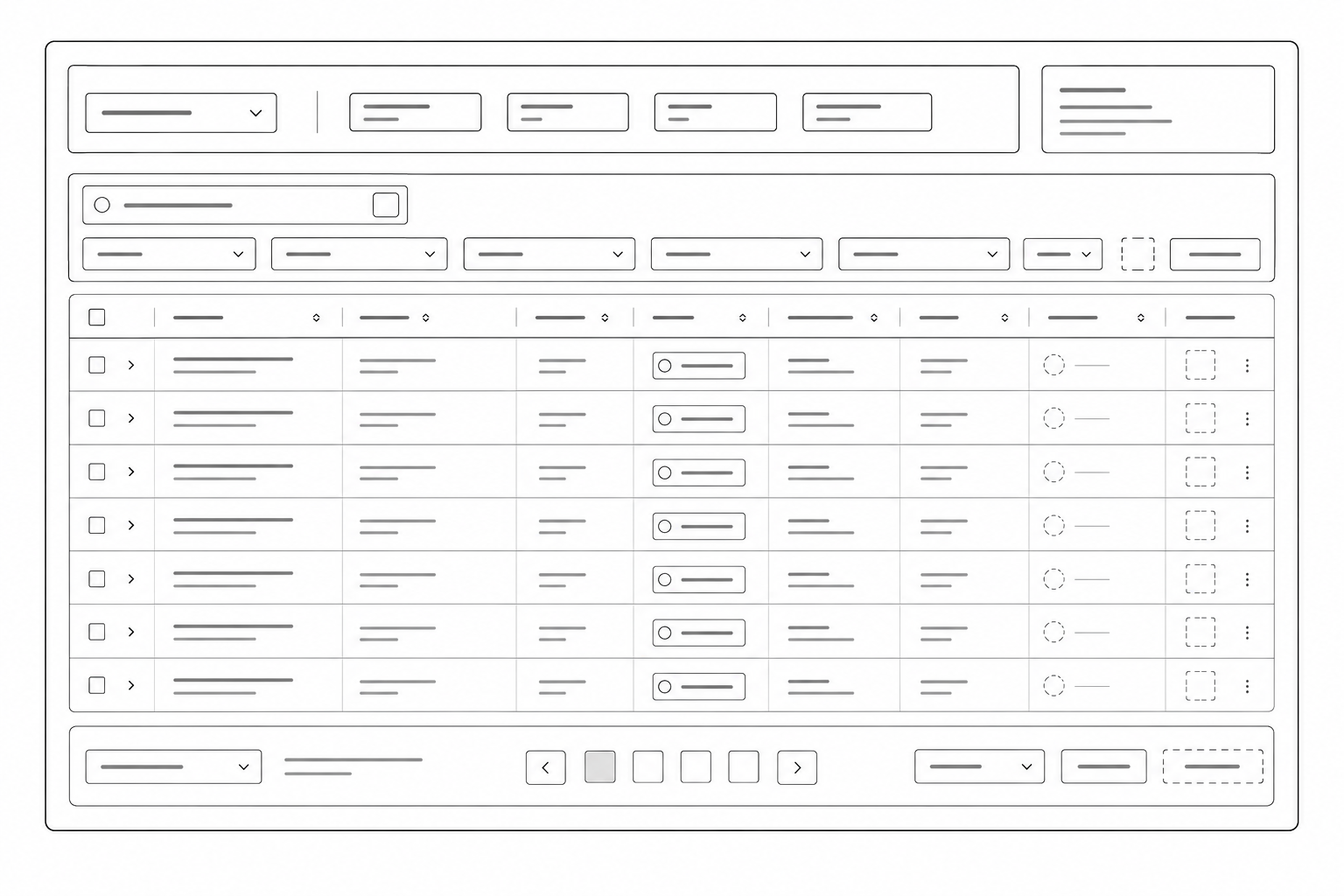
Large technical datasets required better ways to search, filter, sort, compare, and categorize information without hiding important details.
The existing experience required users to navigate through technical structures to reach the information they needed.
The evaluation revealed that the core challenge was not the amount of information, but the effort required to find, understand, verify, and navigate it.
Important project information, versions, documents, and activities were difficult to identify quickly. Users had to spend additional effort searching for information.
“Where can I find the information I need?”
Understanding updates, approvals, and user actions required additional effort, reducing confidence when reviewing project history.
“What changed, who changed it, and when?”
Large amounts of enterprise data required better searching, filtering, sorting, and categorization without hiding important information.
Find → Filter → Compare → Verify
The previous experience required users to navigate through technical structures before reaching the information needed for their tasks.
“How can the system reflect what engineers need to do?”
The redesign needed to make complex enterprise information easier to discover, understand, and trace — without hiding the detail users rely on.
The redesign focused on reducing the effort required to find, understand, manage, and verify project information. The experience was reorganized around the engineer's workflow: discover → manage → update → review → verify.
📁 Project Records
├── project_v1
├── project_v1_final
├── project_v1_final_REAL
├── project_v2_test
└── backup_march
├── Documents
├── Files
└── Activity...
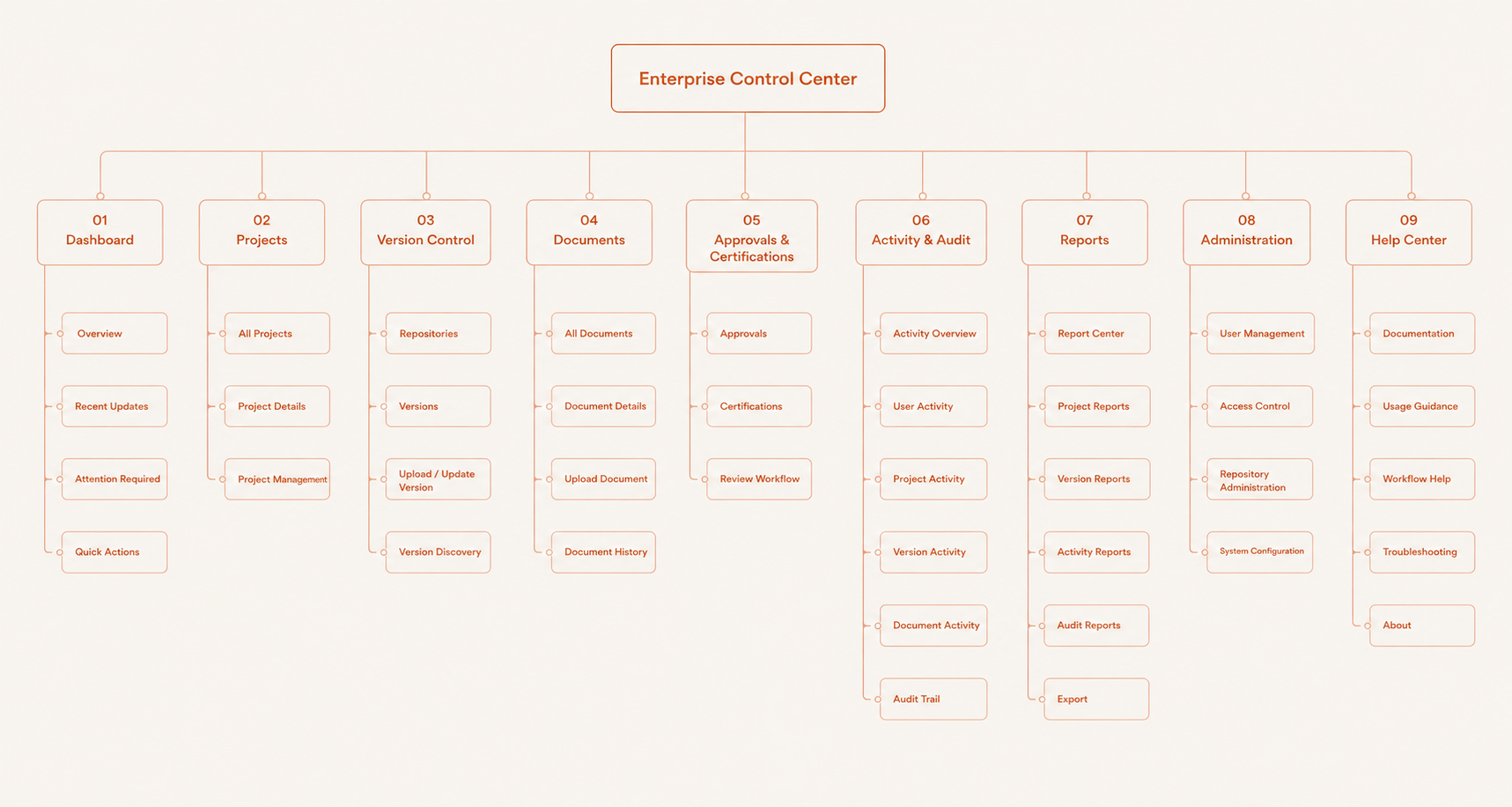
🗂 Enterprise Control Center
├── 📦 Projects
│ ├── Versions
│ ├── Documents
│ └── Status & Details
├── 🔄 Change History
│ ├── Version Activity
│ └── User Actions
├── 📋 Approvals
│ └── Review Status
└── ⚙ Administration
├── Roles
└── Permissions
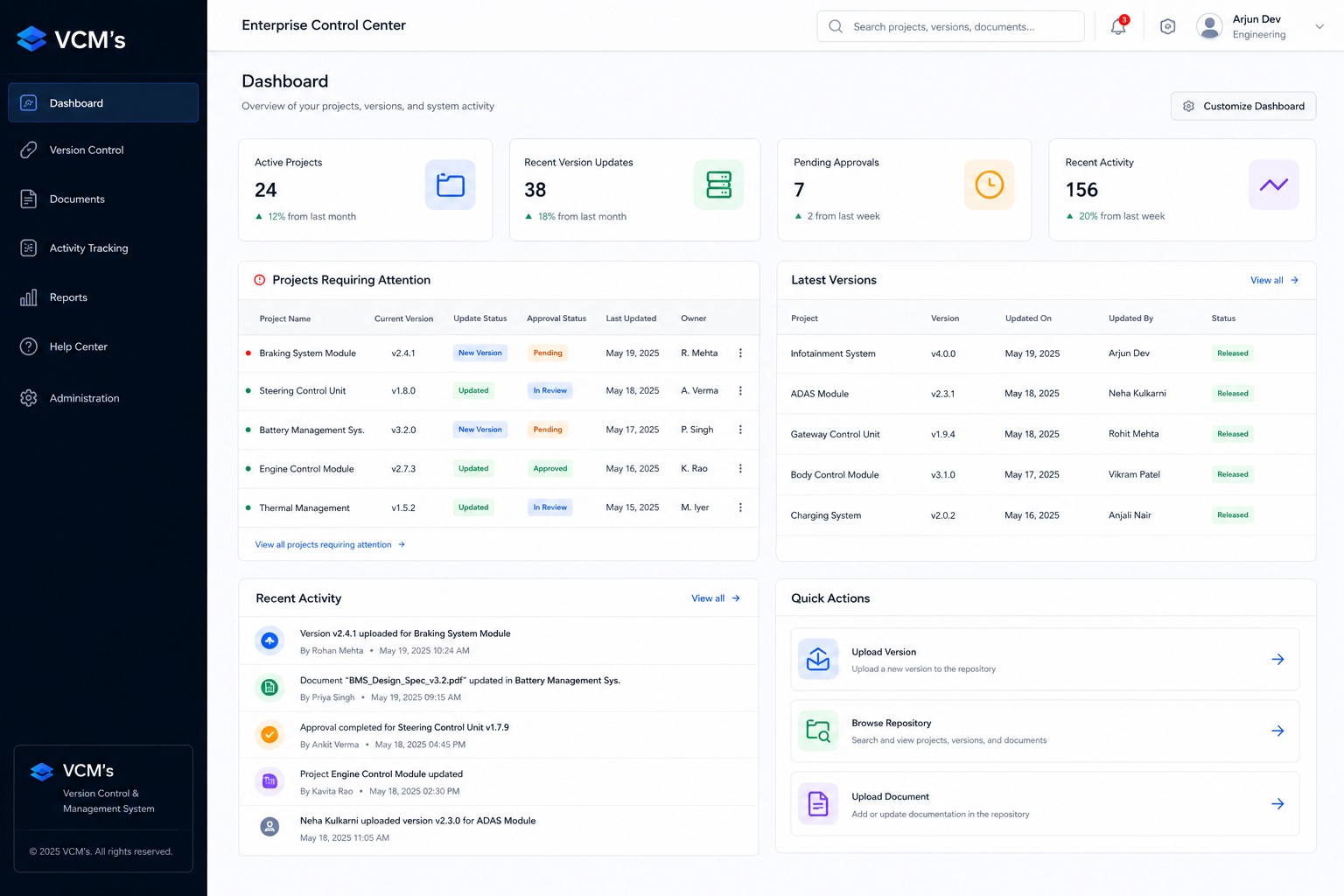
Prioritized recent updates, versions, activity, and actions so engineers could understand what mattered first.
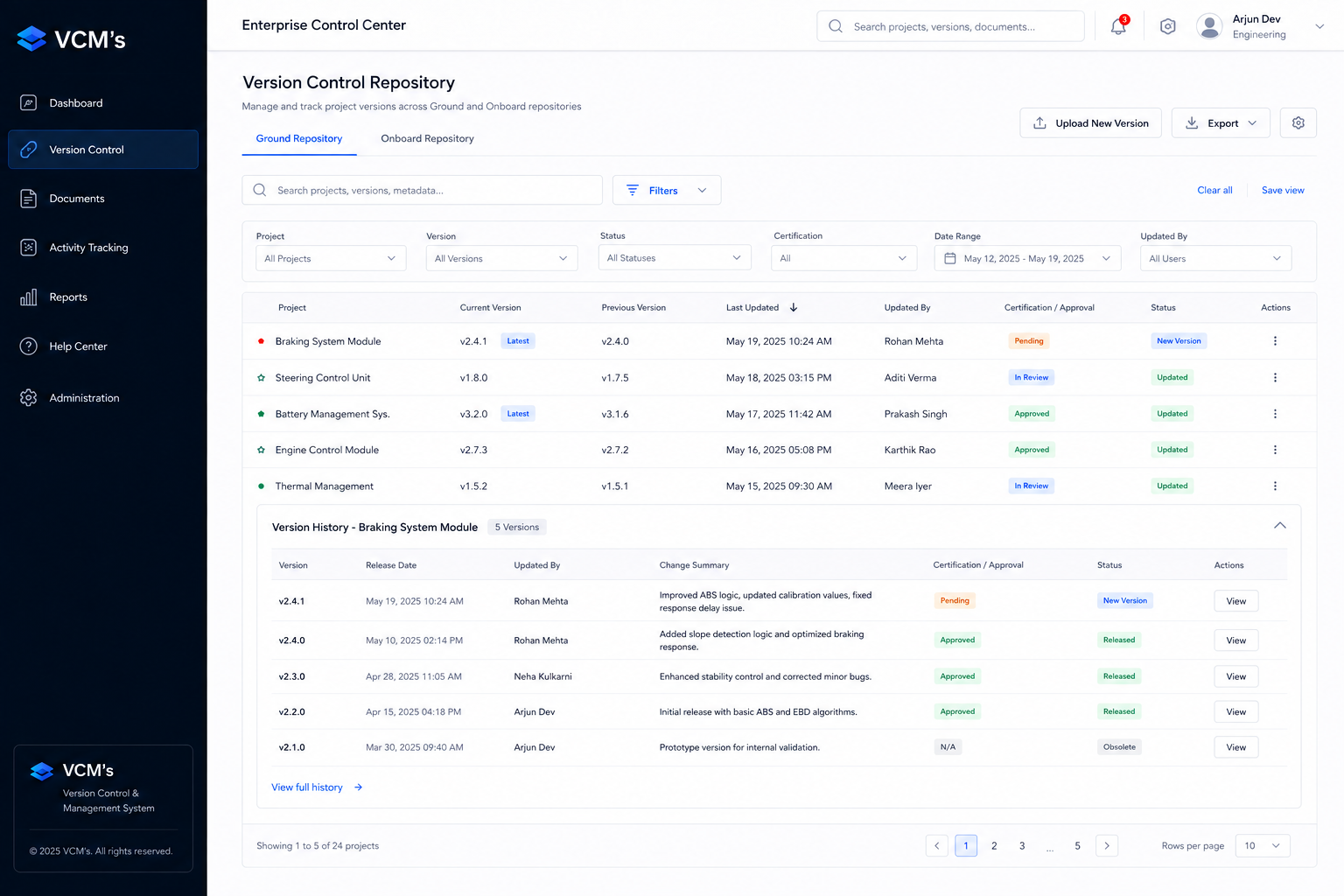
Structured information around Identify → Compare → Verify → Act instead of exposing technical data without hierarchy.
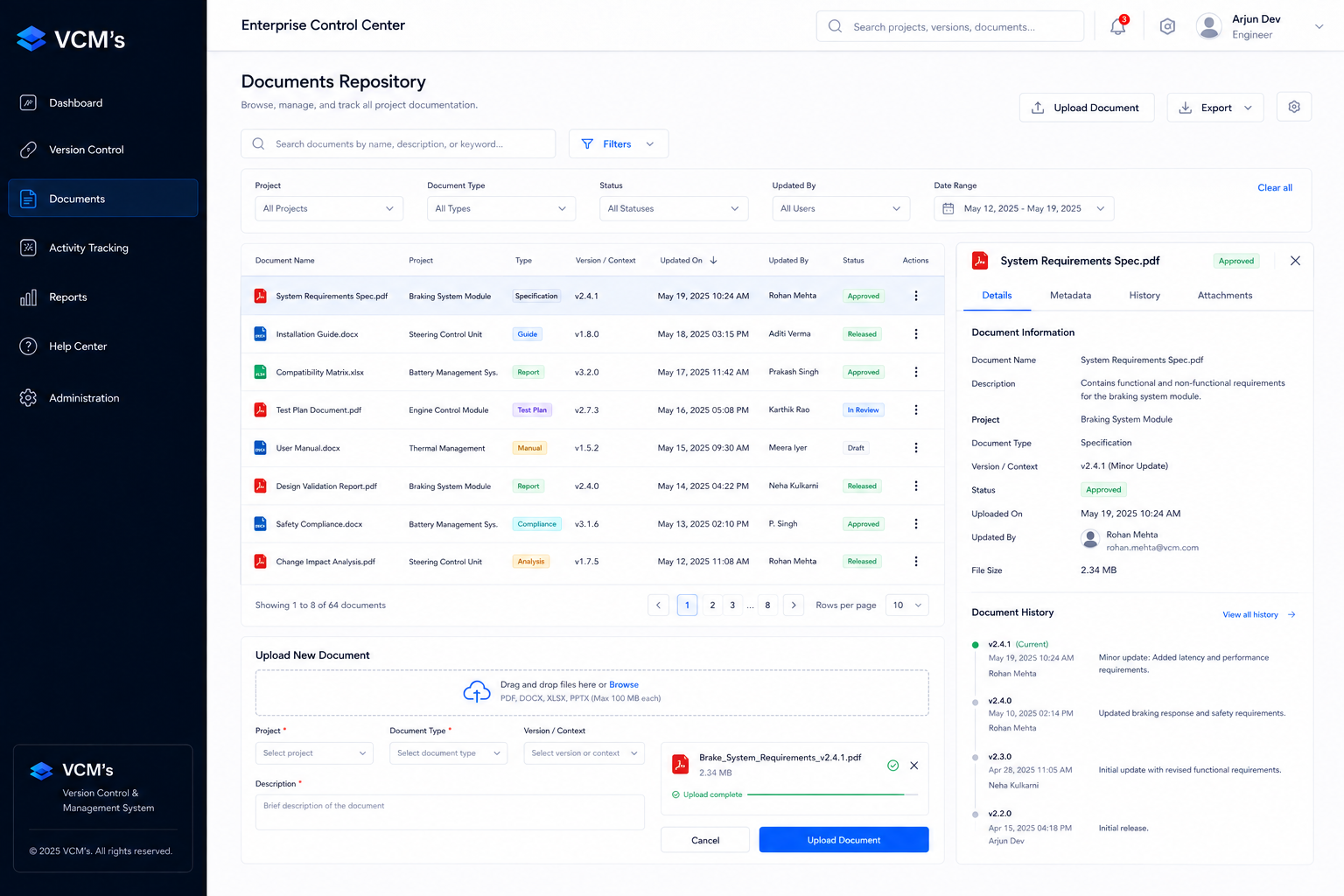
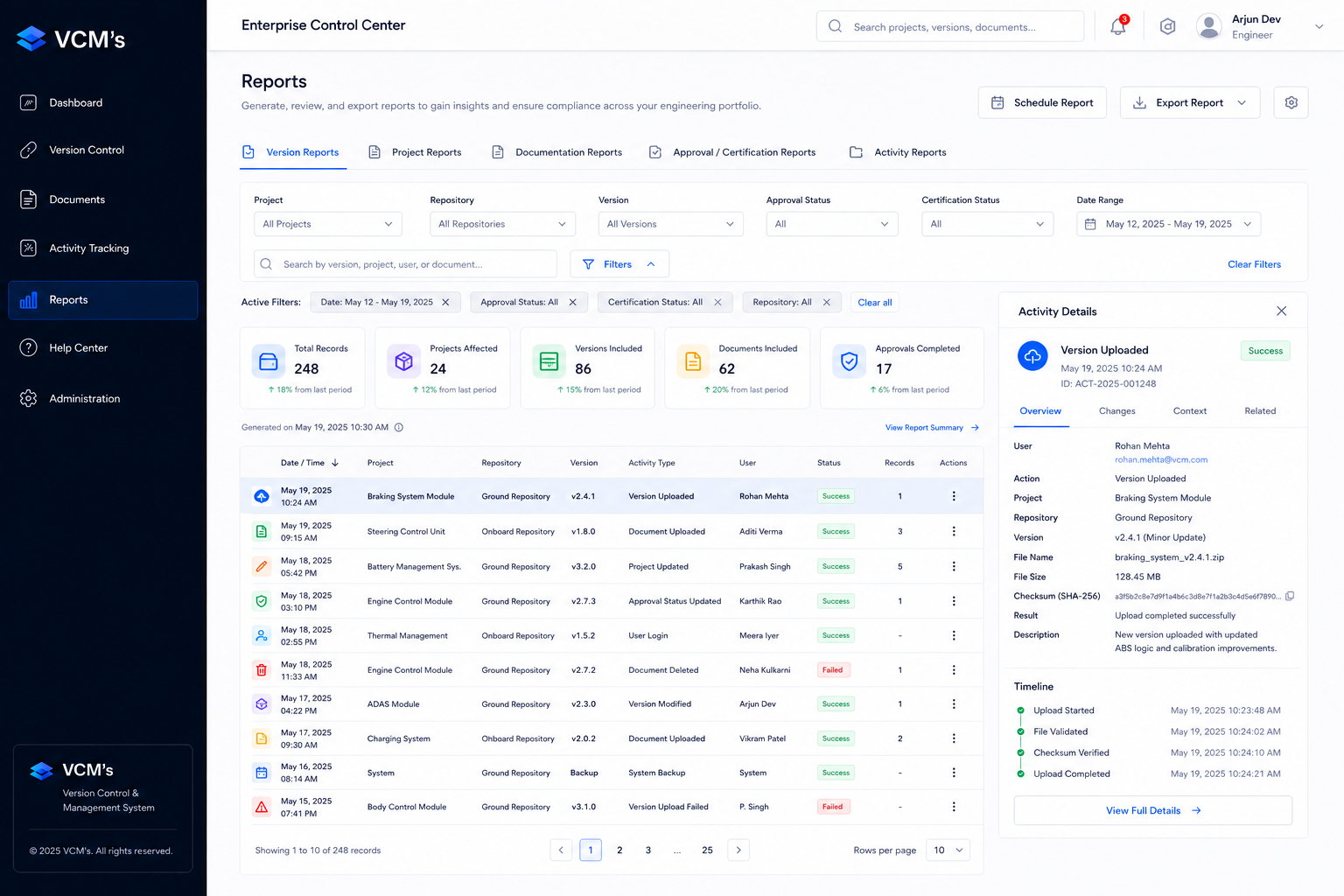
Connected project details, technical metadata, documents, certification, and activity to reduce cross-screen searching.
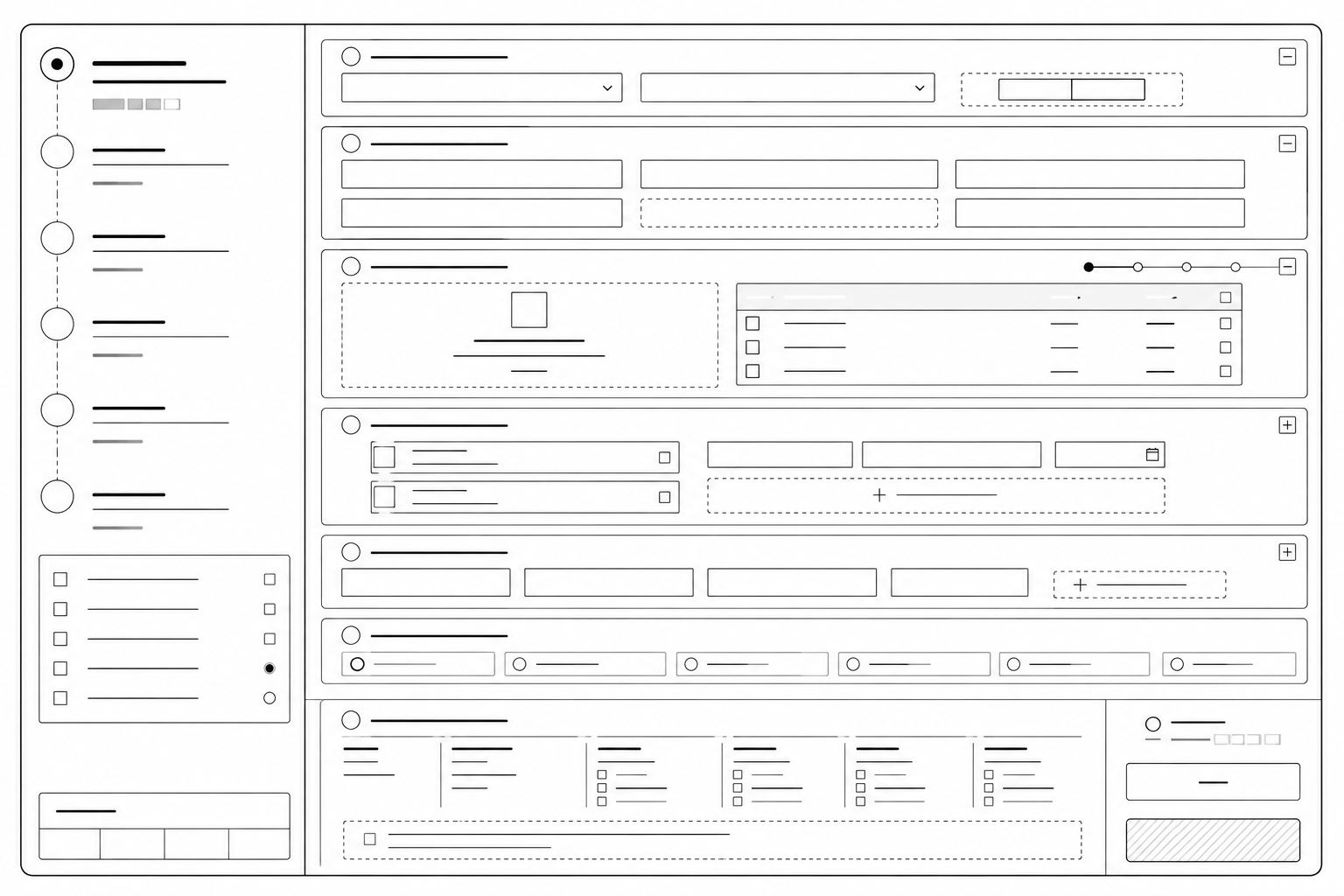
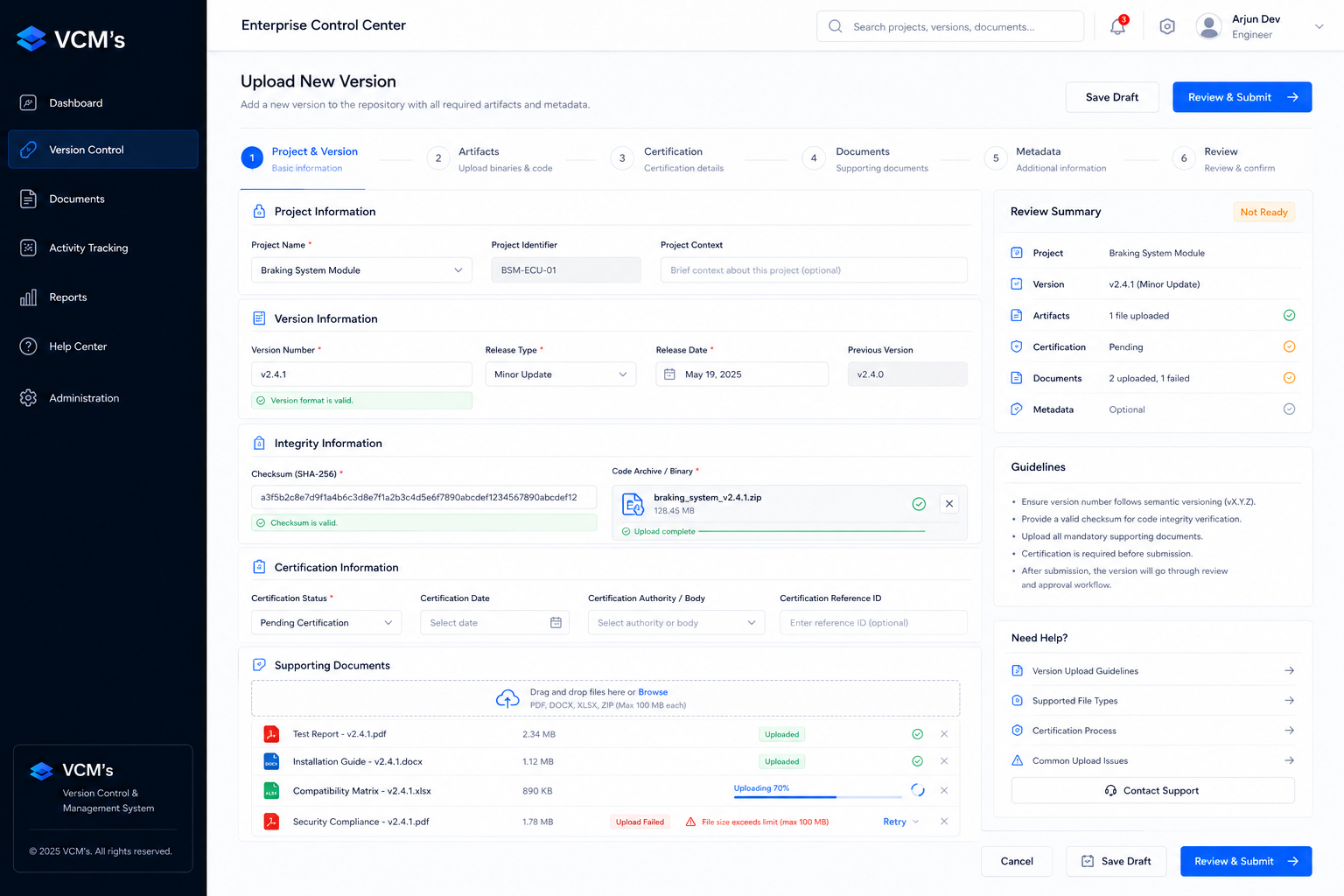
Created clear stages that help users verify information before committing high-impact changes.
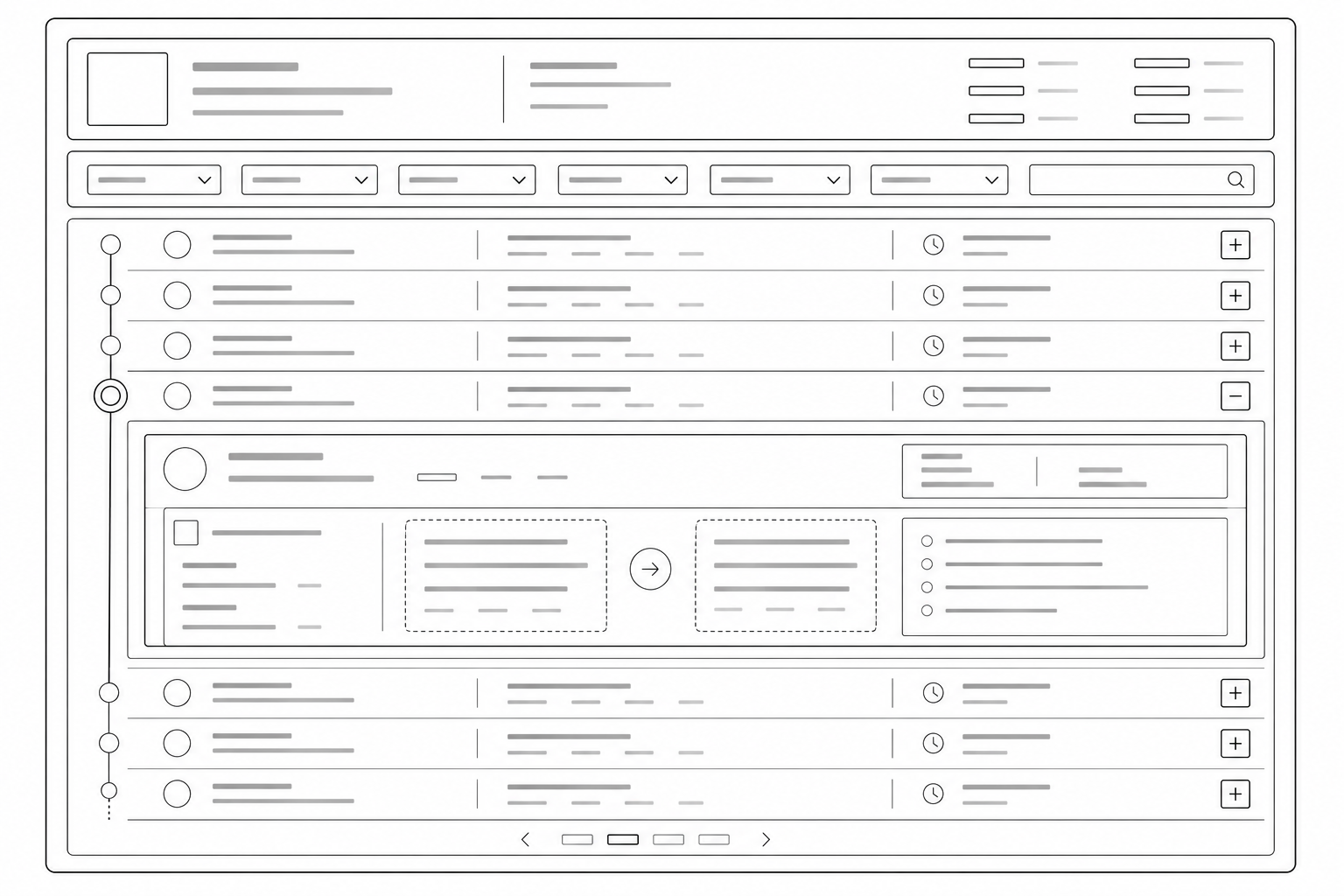
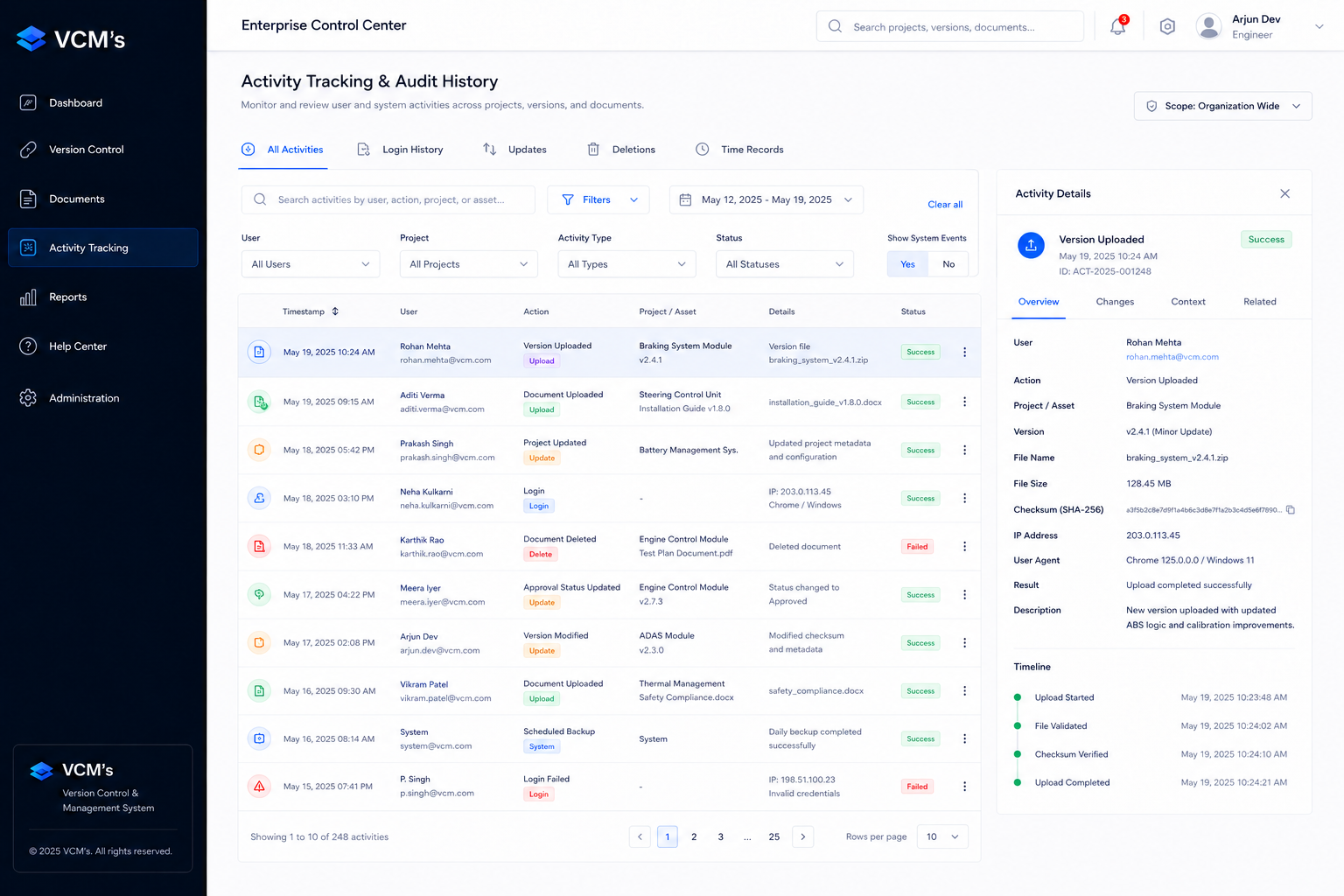
Connected activity through Who · What · Where · When · Context to make project history easier to verify.
The focus was on information hierarchy, navigation, data density, workflow steps, status visibility, primary actions, and interaction states.
The wireframes established the structural foundation for the repository, version workflows, and audit experience before moving into high-fidelity design.
The visual system was designed for environments where accuracy, traceability, and quick decision-making matter more than visual decoration.
Make project state, version status, and important actions immediately understandable.
Organize dense technical information so users can scan important details before secondary metadata.
Keep versions, activity, documentation, approvals, and ownership visually connected.
Use predictable patterns across tables, forms, statuses, actions, and workflows.
Color was used as a supporting signal, while labels and context carried the meaning.
Strong contrast · Clear labels · Predictable interactions · Visible focus states · Understandable validation · Meaning beyond color
The system contained detailed technical information required for version management, troubleshooting, review, and accountability. The challenge was making that information easier to navigate without hiding what expert users needed.
Showing every technical detail at the same level made routine tasks harder to scan and increased the effort required to find important information.
Removing technical details completely would make it harder for engineers and reviewers to investigate changes, understand history, and verify project information.
Surface the information needed for the immediate task first, while keeping deeper technical context available when users need to investigate, compare, verify, or review.
Project status · Current version · Recent activity · Primary actions
Version metadata · Documentation · Approval history · User activity
Change context · Audit trail · Ownership · Supporting records
Workflow structure and information hierarchy were reviewed collaboratively to ensure users could move from discovery to action without unnecessary navigation.
Technical feasibility, backend dependencies, data constraints, and implementation complexity were considered during design reviews.
Interaction states, validation behavior, permission requirements, and component behavior were reviewed to reduce ambiguity across the experience.
Verified production analytics were not available for disclosure, so quantitative performance improvements are intentionally not claimed.
The redesign established a more structured way to discover, manage, review, and trace version information while keeping technical depth available when users needed it.
Each design decision addressed a specific point of friction in the version-management workflow—making information easier to find, understand, verify, and act on.
Engineers had to search across different areas to determine which version was current and what information supported its status.
Project, version, status, ownership, and supporting metadata were brought into a single, scannable structure.
Users could identify and verify version information without reconstructing the context themselves.
Understanding what changed, who changed it, and when it happened required users to connect information manually.
Activity and version history were tied directly to the relevant project and version context.
Users could follow the evolution of a version without manually reconstructing the project's history.
Version updates involved metadata, documentation, certification, review, and submission across one complex flow.
The workflow was divided into explicit stages: identify → define → upload → document → certify → review → submit.
Users received a clearer verification point before committing high-impact version changes.
Projects, versions, documents, certifications, approvals, and activity needed to remain connected.
Simplified the user's mental model while preserving the relationships between connected records.
Different users have different responsibilities and access requirements.
Structured actions and information around role-aware behavior and access.
Some apparently simple interactions could introduce disproportionate backend complexity.
Absorbed complexity through clear grouping, sensible defaults, validation, and contextual guidance.
Product names, screenshots, infrastructure details, datasets, and organizational identifiers are protected.
Used anonymized and reconstructed representations while preserving the UX problem-solving narrative.
Enterprise tables can become decision-making tools: when structured around discovery, comparison, verification, and action, dense datasets can support everyday engineering workflows.