Back
NDA Protected

SecureLink
Cross-Platform Communication System

I redesigned a defence communication platform for secure offline data exchange between Windows and RHEL systems, making connections, messaging, file exchange, and activity status easier to understand and manage.

Industry:  Defence Users:  Engineers Focus:  Clarity & Control
Errors
ADAPTER SELECTION ERRORS
2×
FASTER CONNECTION SETUP
95%
TRANSFER VISIBILITY
Trust
USER CONFIDENCE IN TRANSFERS

Project Snapshot

Industry
Defence Technology
Product
SecureLink
Platform
Desktop Application
Operating Systems
Windows + RHEL
Role
UI UX Designer
Focus
Communication

The Problem Space

01

Making complex communication easier to understand and control.

SecureLink supported offline communication between Windows and RHEL systems, allowing operators to exchange messages, files, and operational information within a controlled local environment.

The Challenge

The existing experience exposed too much technical complexity during routine tasks. Users had to understand connections, identify devices, monitor transfers, and interpret technical errors before completing their work.

Design objective Reduce cognitive effort without hiding important system information.
01

Connection Complexity

Make available connections easier to identify and select.

02

Status Visibility

Make connection & transfer states immediately clear.

03

Transfer Confidence

Help users understand progress & completion without checking.

04

Error Recovery

Turn technical errors into clear and actionable next steps.

My Responsibilities
UX Audit Workflow Analysis Information Architecture Interaction Design Visual Design Prototype Creation

Research Goals

01
How do operators currently identify and select the correct device connection?
02
Where do users struggle to understand connection status and system availability?
03
How do users know which device, file, or message is being transferred?
04
How do users understand transfer progress, completion, and failed operations?
05
What information helps users recover from errors without relying on technical knowledge?
#
Research Approach
Understanding the Existing Workflow Before Redesigning It

The research focused on existing workflows, connection behavior, transfer states, user friction, and technical constraints rather than assumptions from consumer communication products. The approach combined workflow evaluation, heuristic review, information architecture assessment, interaction analysis, and technical/developer discussions.

The goal was to understand not only where users experienced friction, but also what information they needed at each step to confidently connect, transfer data, monitor progress, and recover from errors.

Personas

System Operator
Defence & Engineering Operations
“I need to know which device is connected, what is happening, and whether my data reached the right destination.”
01
Needs

Complete tasks with confidence

  • Identify the correct connection
  • Select the right device quickly
  • Monitor transfer progress
  • Confirm successful delivery
02
Pain Points

Too much technical uncertainty

  • Multiple connections are difficult to scan
  • Status information is unclear
  • Transfer progress is easy to miss
  • Technical errors lack clear direction
03
Goals

Simple, visible and reliable workflows

  • Understand system status at a glance
  • Move between devices with less effort
  • Know when transfers are complete
  • Recover quickly when something fails

Defining the Challenge

The Challenge

Making secure offline connect easier to understand, manage, and trust.

How might we redesign SecureLink so defence operators can quickly identify the right connection, exchange files reliably, and clearly understand system status while working across Windows and RHEL systems in restricted environments?

01 Identify the right connection quickly
02 See connection and transfer status clearly
03 Recover from errors with confidence

Where Users Experienced Friction

01

Connection selection was difficult

Observation

Multiple adapters and technical connection details made it difficult to identify the correct device.

User Impact

Users spent additional time checking connections before starting a transfer.

Design Opportunity
Make the active connection and device identity immediately visible.
02

Connection status lacked clarity

Observation

Users could not always tell which device was connected, available, or ready for communication.

User Impact

Unclear system states created uncertainty during routine communication tasks.

Design Opportunity
Use consistent status indicators with clear connection states.
03

Transfer progress needed stronger visibility

Observation

Users needed clearer feedback to understand whether a file or message was transferring.

User Impact

Limited feedback made users uncertain about transfer progress and completion.

Design Opportunity
Show progress, completion, and failure states at the point of action.
04

Technical errors lacked clear direction

Observation

Technical error messages did not clearly explain what went wrong or what users should do next.

User Impact

Users had to interpret technical information before they could recover from an issue.

Design Opportunity
Replace technical errors with clear, actionable recovery guidance.

Strategy with Principles

Instead of exposing network complexity directly to operators, SecureLink was structured around a clear operational journey: connect → verify → exchange → monitor → recover.

01
Connection Visibility
Make available adapters, active connections thier status easy to identify at a glance.
02
Clear Status
Show connection and transfer clearly so operators always know what is happening.
03
Guided File Exchange
Simplify file selection and transfer into a predictable workflow with visible progress.
04
Operational Feedback
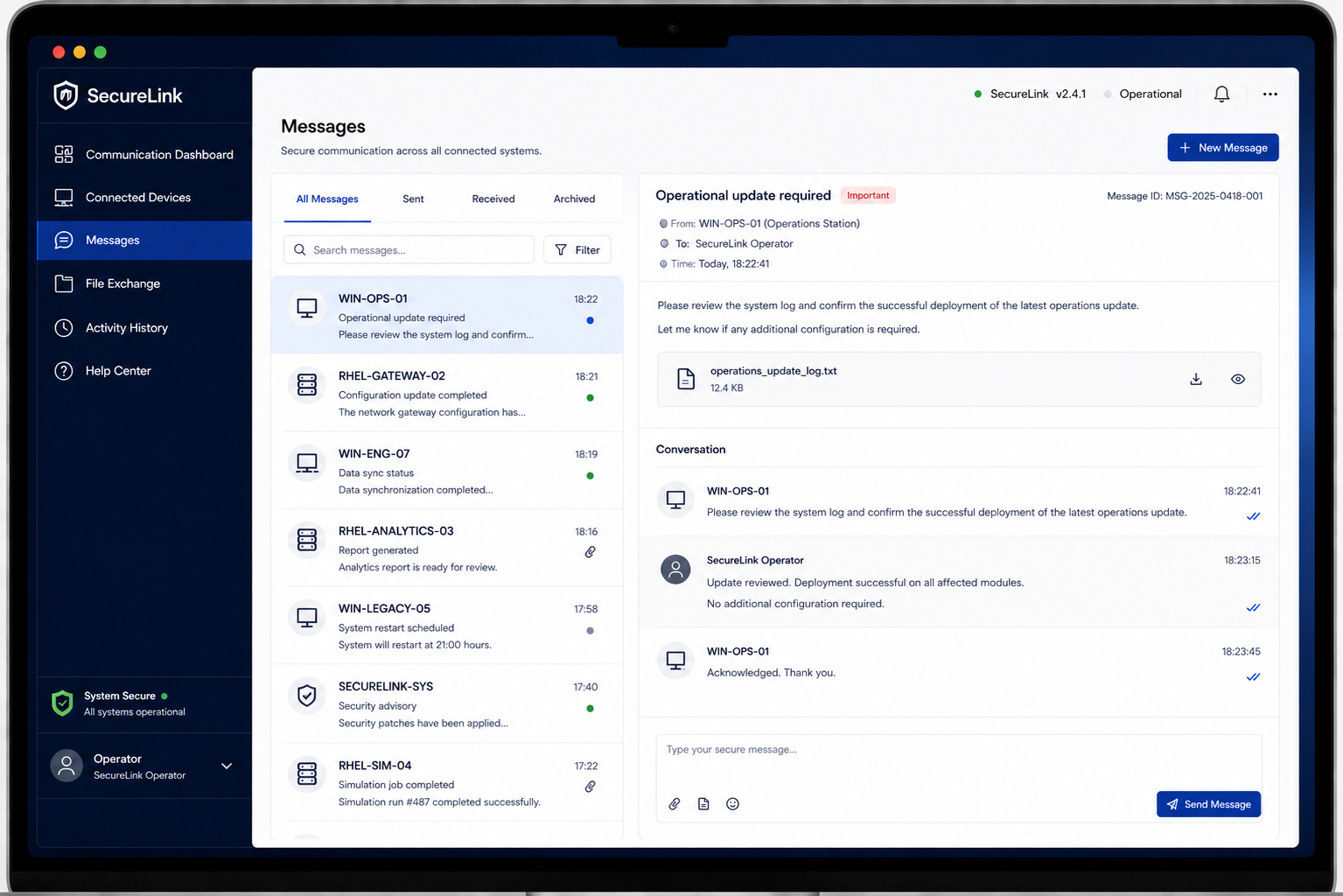
Provide meaningful feedback for completed, active, interrupted, and failed tasks.
05
Actionable Recovery
Replace technical errors with clear guidance to understand the issue and recover quickly.

Five Key Design Decisions

01
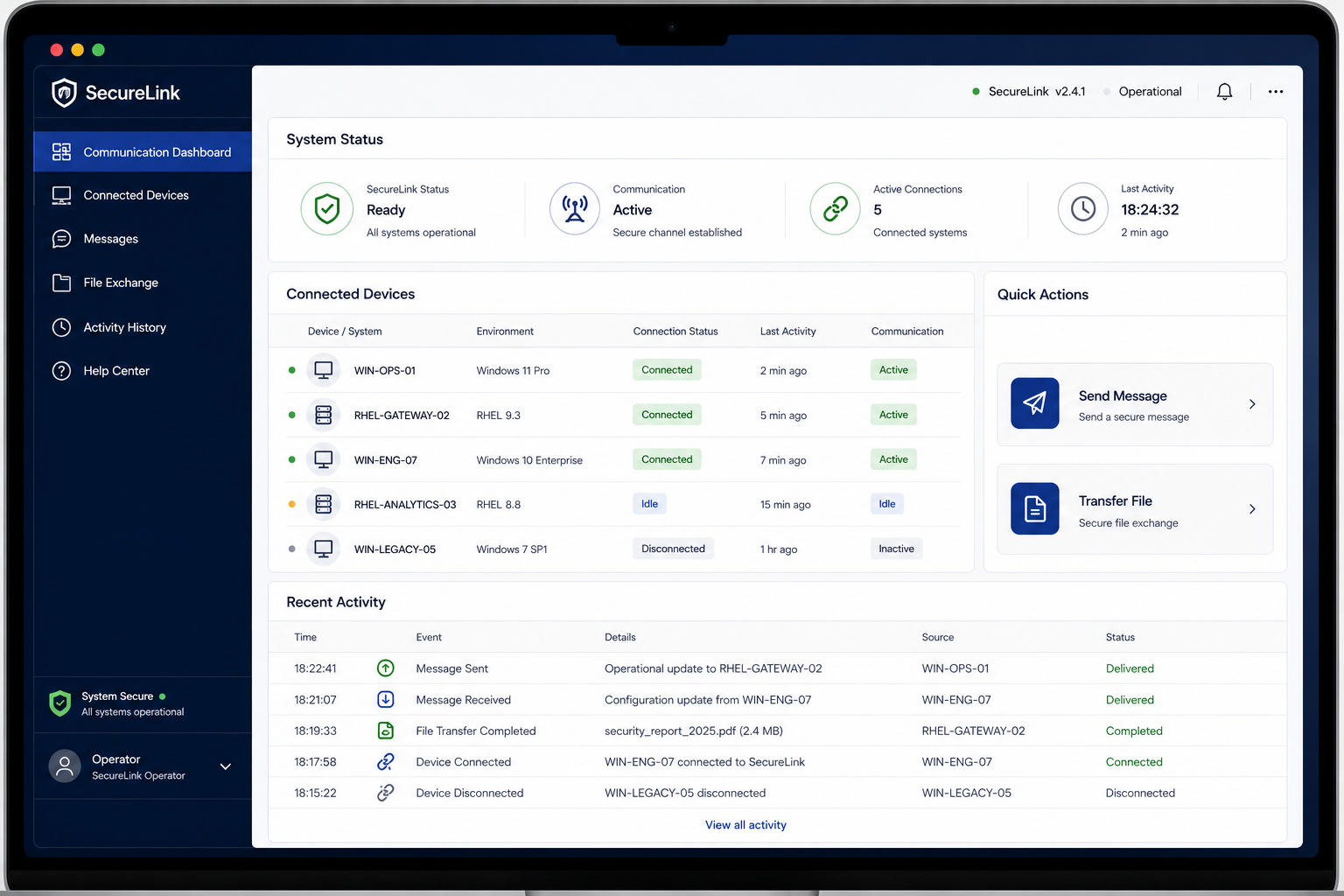
Connection Dashboard
Made Connection Status Visible at a Glance

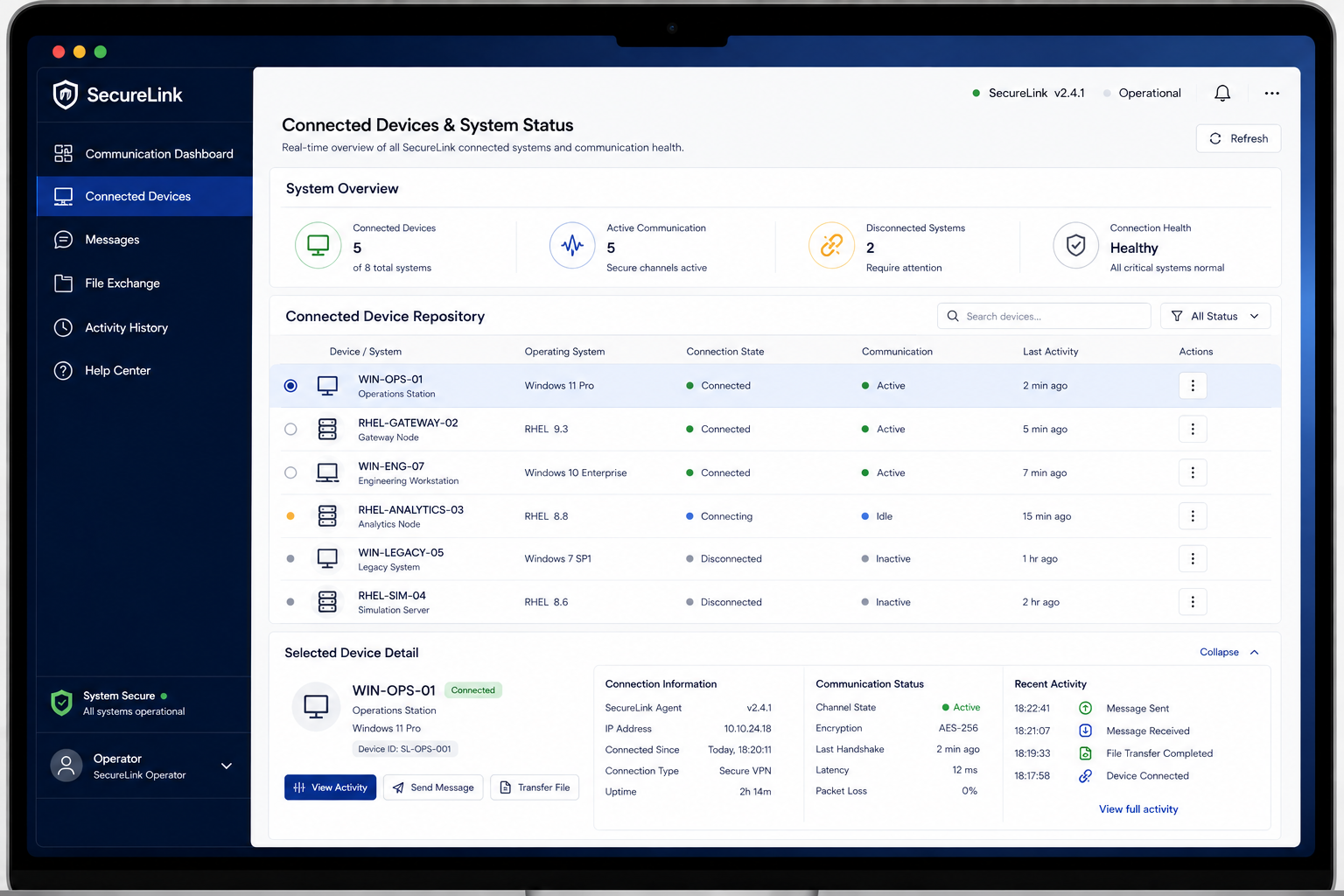
The dashboard was redesigned around the operator's immediate need: “What is connected and ready to use?” Active adapters, device status, connection state, and key system information were surfaced clearly to reduce network-related confusion.

02
Device Selection
Simplified Choosing the Right Device

Device selection was organized around Identify → Verify → Select, making available devices, connection states, and relevant details easier to compare before starting communication.

03
File Exchange
Turned File Transfer into a Clear Guided Workflow

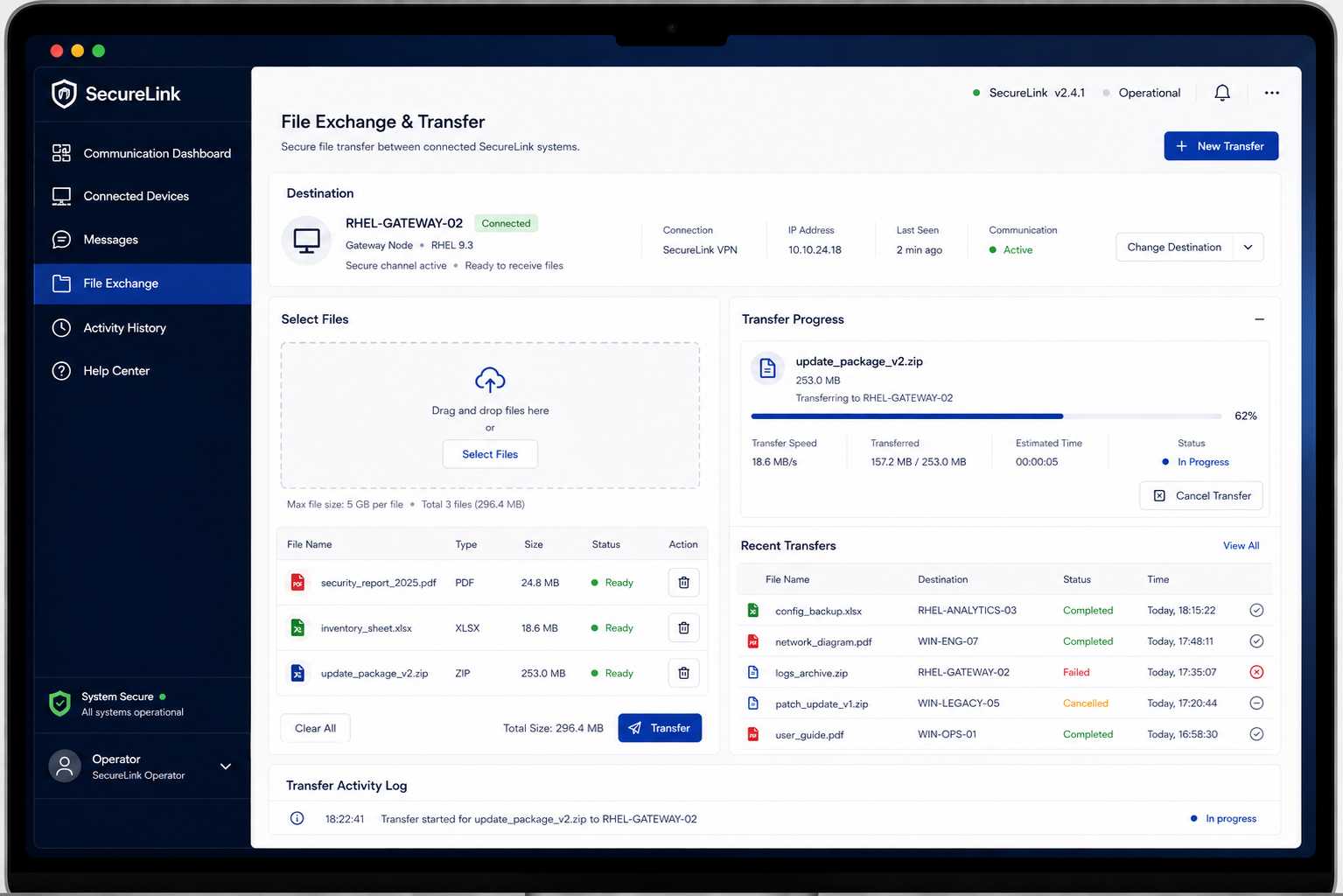
The file exchange experience was structured around Select → Send → Monitor → Confirm. Clear file information, transfer progress, speed, and completion status helped operators understand exactly what was happening.

04
Status & Feedback
Replaced Technical Uncertainty with Clear Feedback

Connection and transfer states were designed to communicate what happened, what is happening, and what happens next. Status indicators, progress feedback, and confirmation states reduced uncertainty during critical operations.

05
Error Recovery
Turned Technical Errors into Actionable Guidance

Instead of exposing users to unclear technical errors, the experience provided Problem → Explanation → Recommended Action. This helped operators understand the issue and recover without needing to interpret complex networking terminology.

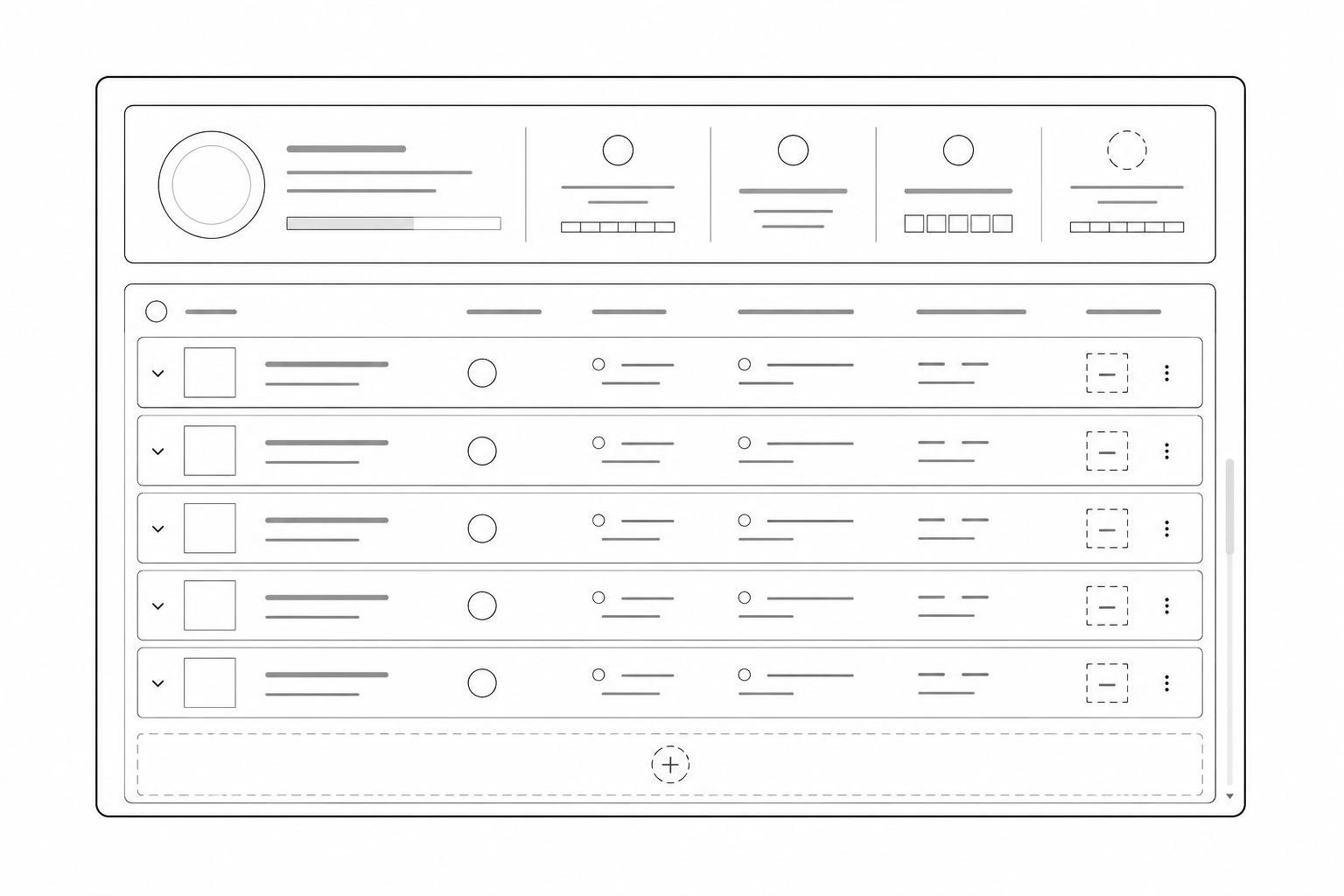
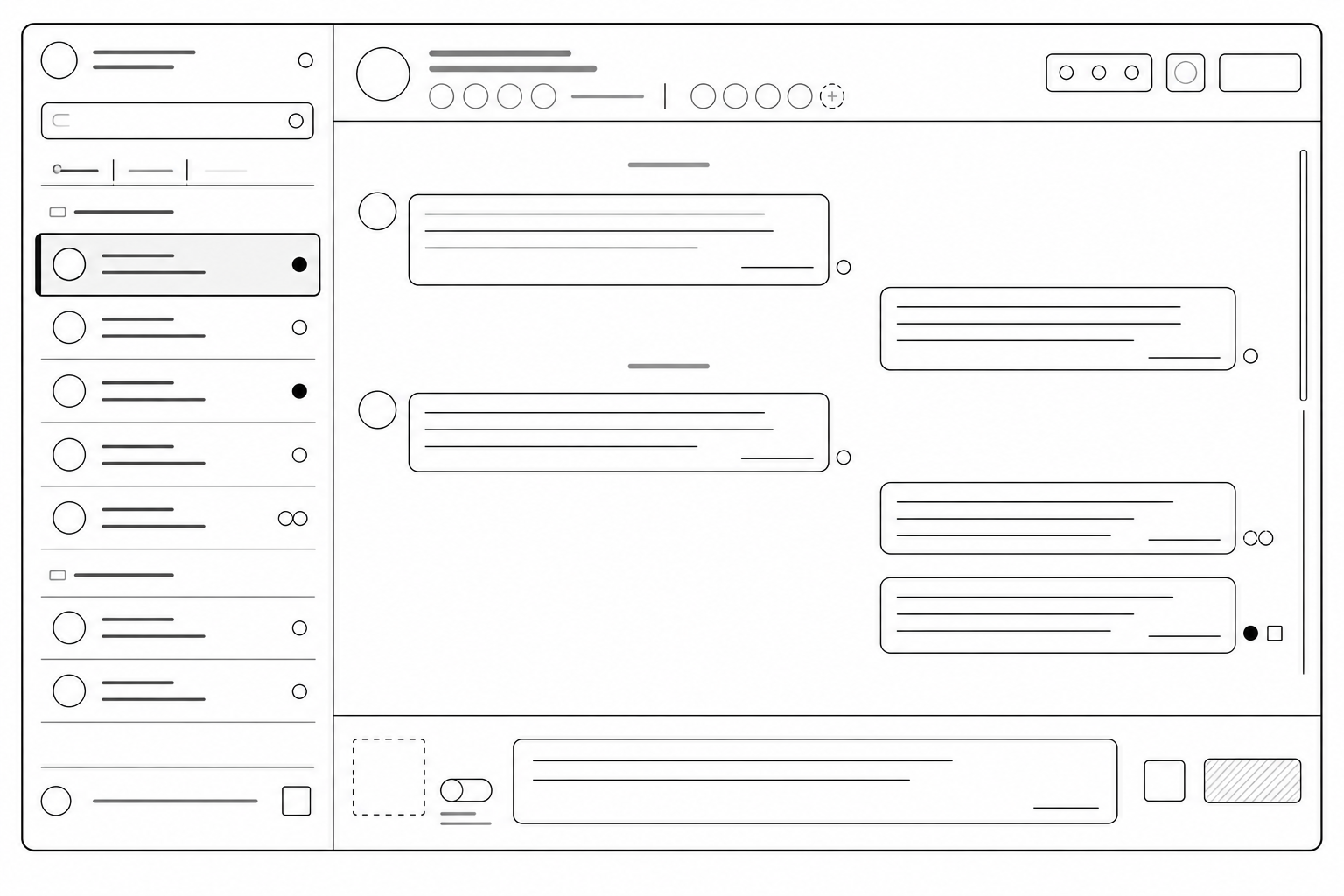
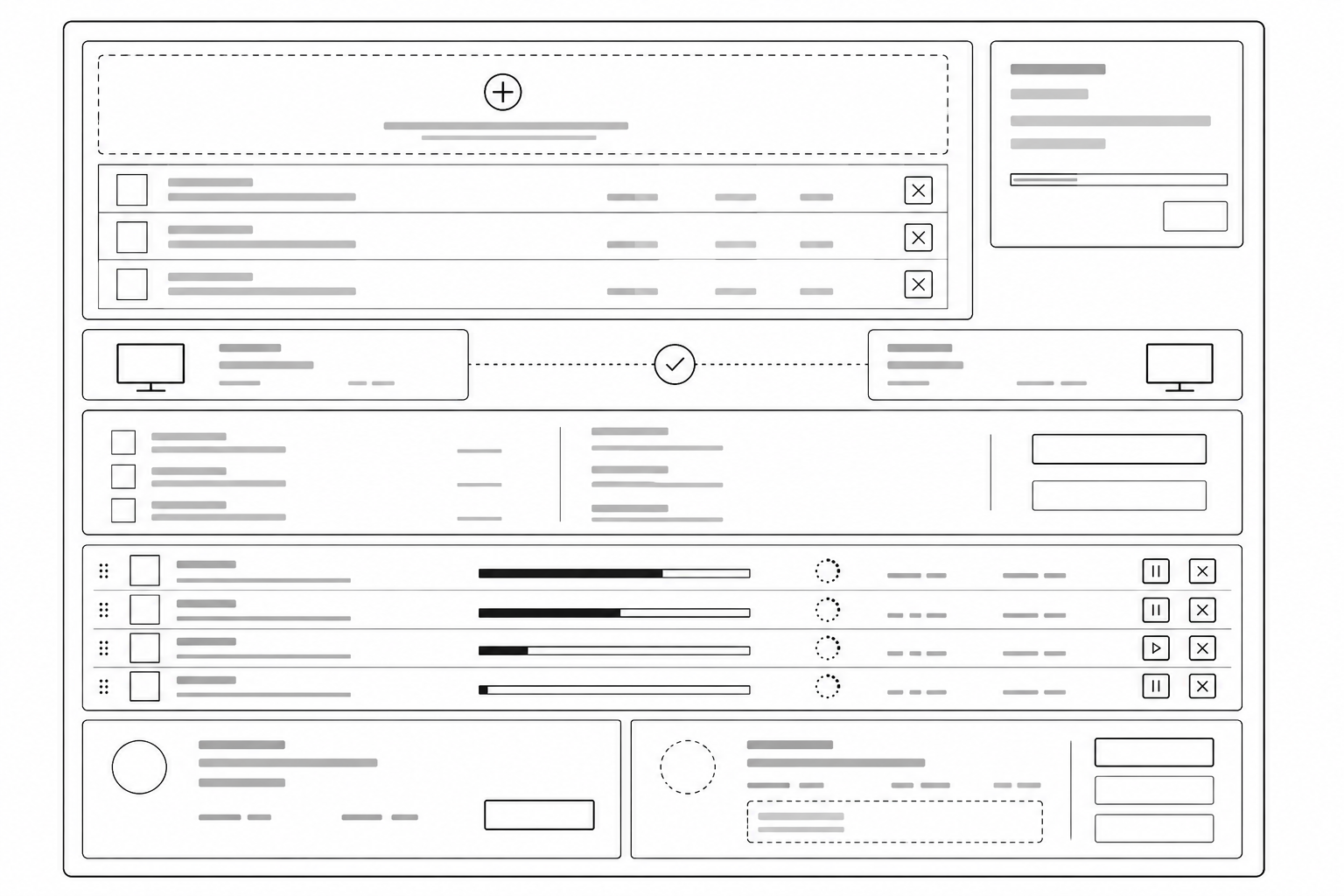
Structure Before Visual Polish

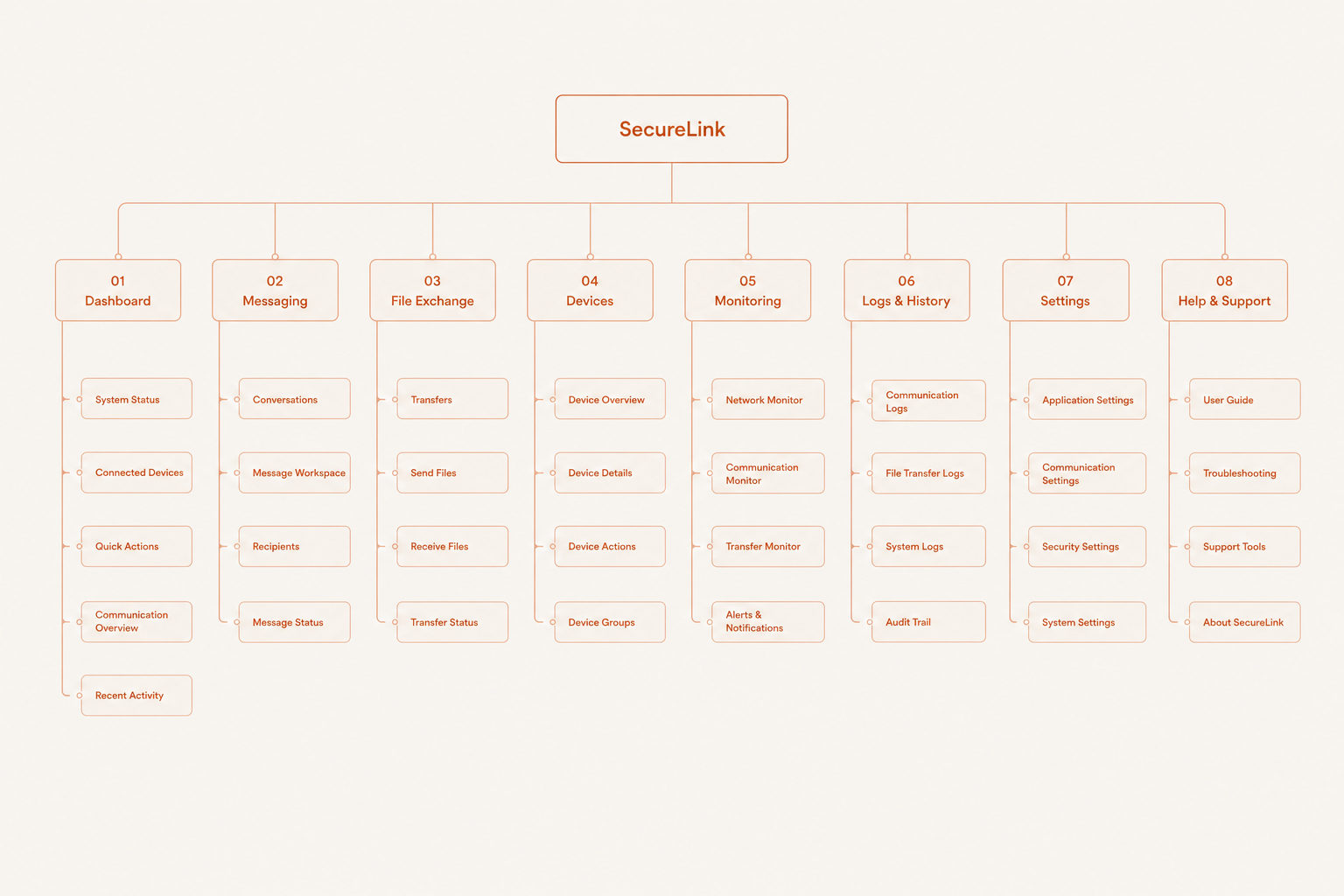
The focus was on information hierarchy, navigation, data density, workflow steps, status visibility, primary actions, and interaction states.

The wireframes established the structural foundation for the workflows, and audit experience before moving into high-fidelity design.

Clear. Operational. Trustworthy.

Design Principles

Visible — Make connection, device, message, and transfer states visible.
Operational — Prioritize information and actions operators need during tasks.
Predictable — Keep navigation, feedback, and system behavior consistent.
Focused — Reduce technical detail so operators can focus on the task .
Trustworthy — Feedback for what is connected, active, completed, or failed.

Operational Status System

State SecureLink Meaning
Connect Active device connection / Ready for communication
Active Message or file transfer currently in progress
Attent Connection or transfer requires operator attention
Failed Communication or transfer could not be completed
Offline Device unavailable or not currently connected
Operator Feedback
Connection visibility · Transfer progress · Clear completion states · Actionable errors · Device availability · Message status · Consistent interaction feedback
Visual Language
Strong hierarchy · Clear status indicators · High information visibility · Consistent controls · Minimal visual noise · Action-oriented feedback

SecureLink Design System

Why These Decisions Mattered

01
Connection-first architecture
Organizing the experience around communication readiness
Problem Operators had to interpret technical network information before knowing whether a device was ready to communicate.
Decision Structure the experience around connection, device selection, communication, transfer, and recovery.
Rationale The interface should reflect the operator's actual communication workflow rather than the underlying network architecture.
User benefit → Less mental translation between technical system information and operational action.
02
Persistent connection visibility
Making device availability visible before users act
Problem Operators could be uncertain about which devices were connected, available, or offline.
Decision Make connected devices, adapter status, and availability immediately visible within the interface.
Rationale Knowing the current system state is essential before initiating communication or file exchange.
User benefit → Faster recognition of which devices are ready for communication.
03
Clear source and destination
Making the communication path explicit before transfer
Problem Selecting or communicating with the wrong device could create unnecessary operational risk.
Decision Clearly identify the source device, destination device, and selected communication context before sending data.
Rationale Operators should be able to verify where information is coming from and where it is going before a consequential action.
User benefit → Greater confidence that communication is directed to the intended device.
04
Transparent transfer progress
Showing exactly what is happening during file exchange
Problem Long-running transfers could leave operators uncertain about whether the system was still working.
Decision Provide visible progress, transfer speed, estimated time remaining, and clear completion states.
Rationale Continuous feedback reduces uncertainty and prevents unnecessary repeated actions during active transfers.
User benefit → Operators can distinguish active, completed, interrupted, and failed transfers.
05
Actionable error recovery
Turning technical failures into clear recovery paths
Problem Technical errors such as connection failures could explain what went wrong without helping operators recover.
Decision Replace ambiguous technical messaging with clear explanations, relevant context, and specific recovery actions.
Rationale Error handling should help operators return to the task instead of forcing them to diagnose the system independently.
User benefit → A clear path from communication failure back to successful operation.

Simplifying Communication Without Losing Control

The central design challenge was how to simplify a technically complex communication system without hiding the information operators need to understand connections, transfers, and system health.

The solution was progressive disclosure with clear operational feedback.
Primary layer — operational
Connected Device available Ready to communicate Transfer in progress Transfer complete
Secondary layer — technical
IP address Network adapter details Connection diagnostics Transfer metrics
Two extremes avoided

A technically dense interface makes routine communication tasks difficult to scan and increases operator cognitive load.

An overly simplified interface makes troubleshooting difficult when connections fail or transfers are interrupted.

The goal was not to hide technical complexity. It was to surface the right operational information first and reveal deeper technical details only when they were needed.

The Final Experience

What We Reviewed

The redesigned SecureLink experience was reviewed with developers and technical stakeholders to ensure that the proposed workflows were clear, technically realistic, and aligned with the communication system's operational requirements.

Connection, device selection, messaging, and file-transfer workflows were reviewed for clarity and consistency.
Connection states, transfer progress, completion feedback, and interrupted communication states were reviewed to reduce uncertainty.
Error handling and recovery flows were reviewed to ensure technical failures could be communicated through clear, actionable guidance.
The review also considered technical feasibility, platform constraints, implementation dependencies, and the need to preserve deeper diagnostics for engineering users.

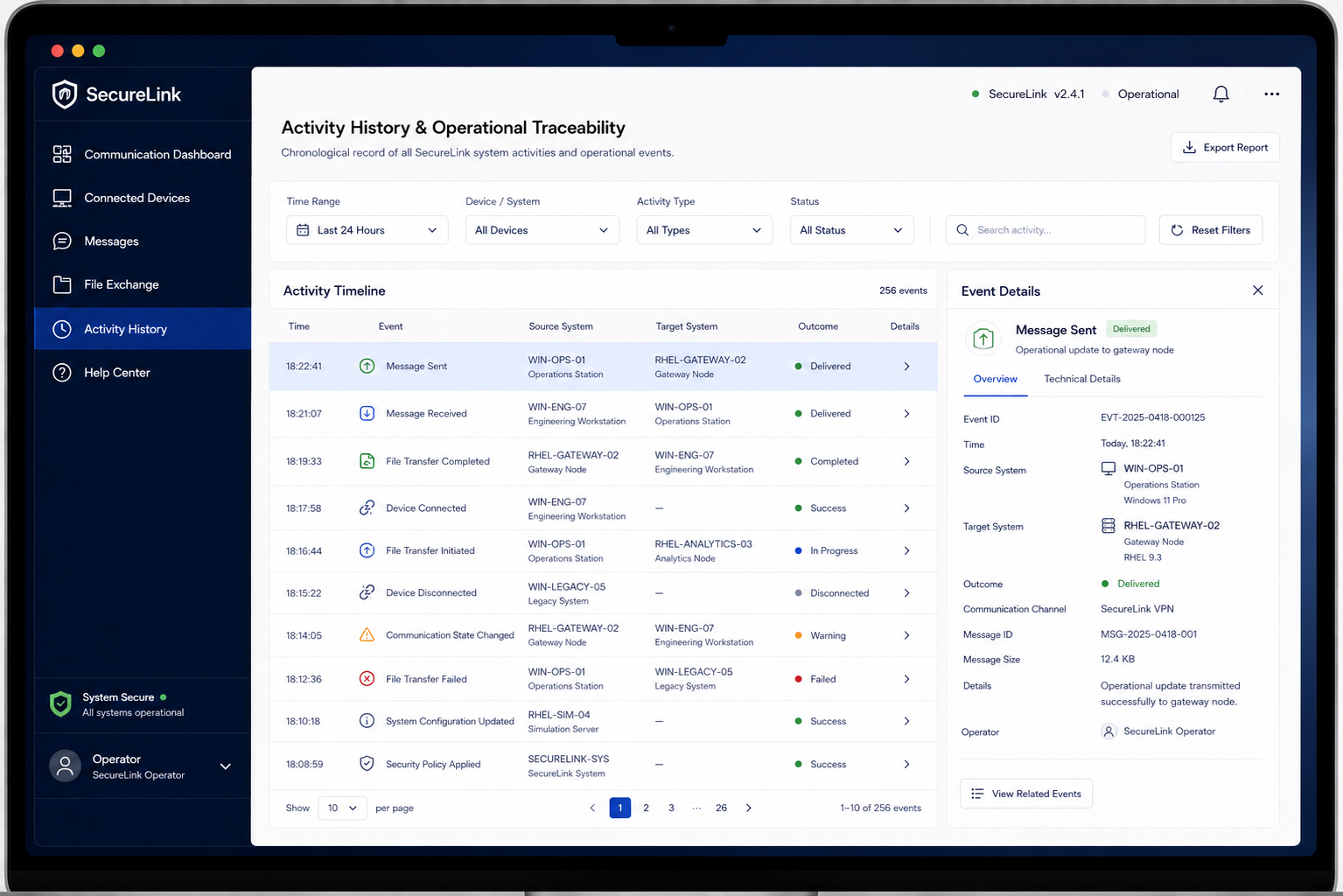
Designing for Traceability

Challenge

Users frequently selected inactive network adapters because the list was unorganized and treated all adapters equally.

Solution

The UI automatically highlighted active Ethernet connections and forced inactive adapters lower in the visual hierarchy list.

Outcome

Faster adapter selection and fewer connection errors.

Challenge

Users repeatedly clicked the Send button because there was no visual indication that the file transfer had started.

Solution

Introduced an animated progress bar, transfer percentage, estimated time, and clear success confirmations.

Outcome

Increased user confidence, eliminated duplicate transfers.

Improving Clarity Within a Security-Sensitive System

01
Existing Technical Architecture
The redesign needed to improve usability without unnecessarily changing the underlying technical architecture or established operational behaviour.
Improve the experience around existing system capabilities rather than redesigning the underlying technology.
02
System-State Accuracy
Connection, messaging, transfer, and error states needed to reflect the actual condition of the underlying system.
Design explicit and predictable states while validating important UI states with engineering.
03
Operational Workflows
The interface had to support communication, file exchange, connection monitoring, and system-status workflows without disrupting established operational behaviour.
Reframe technical functionality around operator goals: Understand → Act → Confirm → Monitor.
04
NDA & Security Constraints
Security mechanisms, infrastructure, deployment details, customer information, and sensitive operational data could not be publicly disclosed.
Use anonymised or reconstructed screens while keeping the UX narrative focused on clarity and predictable interaction.

Key Learnings

01
Complex systems need clarity before more features: when a product already does many things, the UX challenge is often helping users understand which information and action matter most at the moment.
02
System awareness is part of the task: in communication software, sending a message is only part of the experience. Users also need to understand connection status, recipients, progress, and whether the action actually happened.
03
Legacy redesign requires respect for existing workflows: not everything in an established product is wrong. Understanding the reasons behind existing workflows is essential before simplifying or changing behaviour.
04
Good UX can reduce uncertainty: in sensitive operational environments, clearer labels, stronger hierarchy, visible states, predictable actions, and better feedback can be more valuable than visual sophistication.

"In complex operational software, good UX is not about making the system feel simple. It is about making the complexity understandable."

This project taught me that system awareness is part of the task. Clear hierarchy, visible states, predictable actions, and meaningful feedback can reduce uncertainty without hiding the complexity behind the system. I also learned to respect existing workflows and validate changes before changing established behaviour.

Return to Portfolio